

Webhook Console
Webhooks are managed in the Partner Dashboard under Developer > Webhooks. The page has three tabs:- Webhook Logs: every delivery attempt, with the response code and how long your endpoint took
- Manage Webhooks: the endpoints you have registered, and the events each one receives
- Integration Guide: sample code for verifying signatures in your language
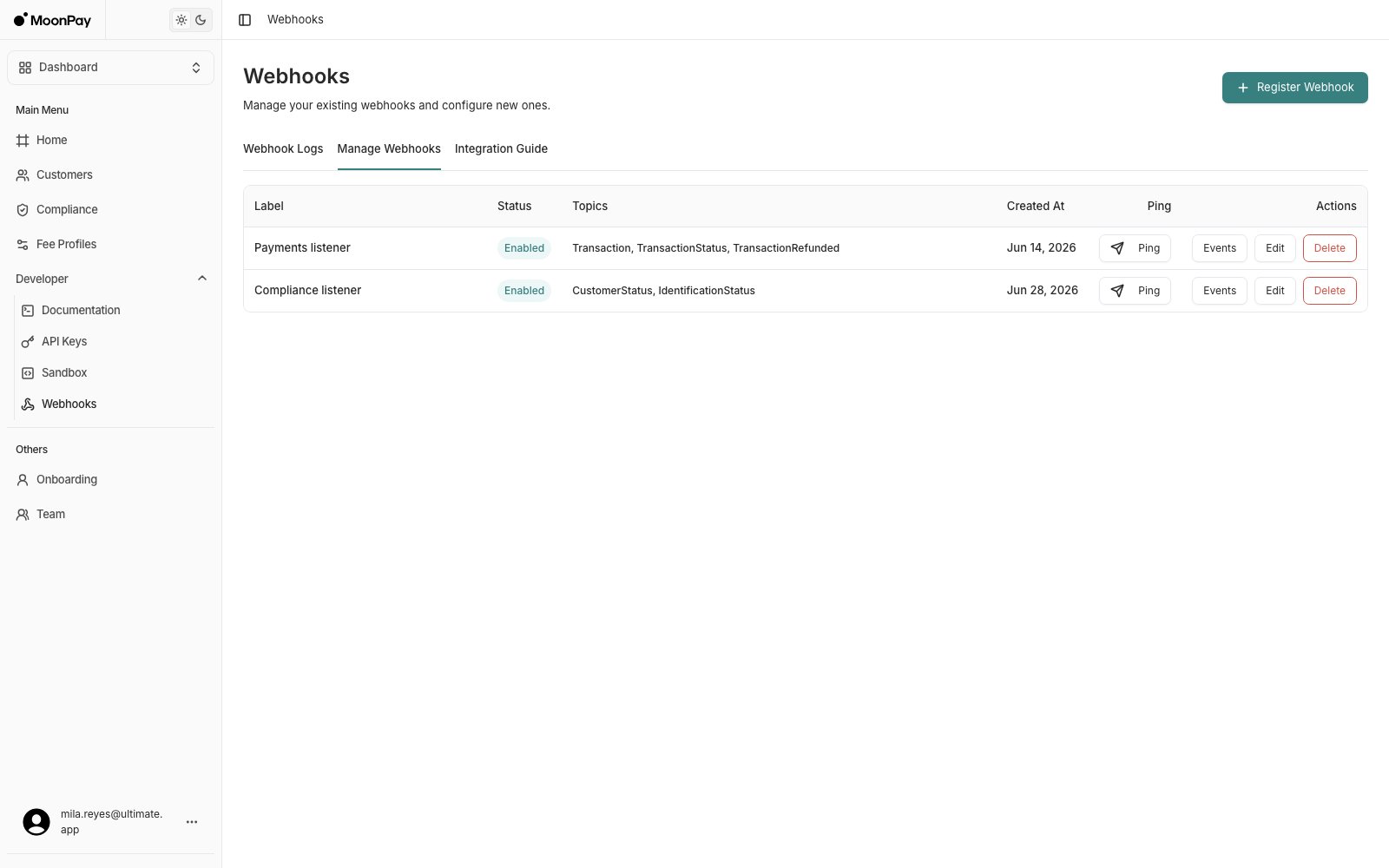
Manage Webhooks: the endpoints registered on your account
Fields
- Label: The name of your webhook. If a delivery to it failed, a warning icon appears next to the name. Hover over it for the failure reason
- Status: Whether the endpoint is enabled. A disabled endpoint stays registered and receives nothing
- Topics: The events this endpoint is subscribed to
- Ping: Sends a test delivery to the endpoint, so you can confirm your handler answers before real events arrive
Delivery logs
The Webhook Logs tab lists every attempt MoonPay Enterprise made, newest first. Open a row for the full request: the signed headers, the exact JSON body sent, the response code, and a Retry delivery button for the ones that failed.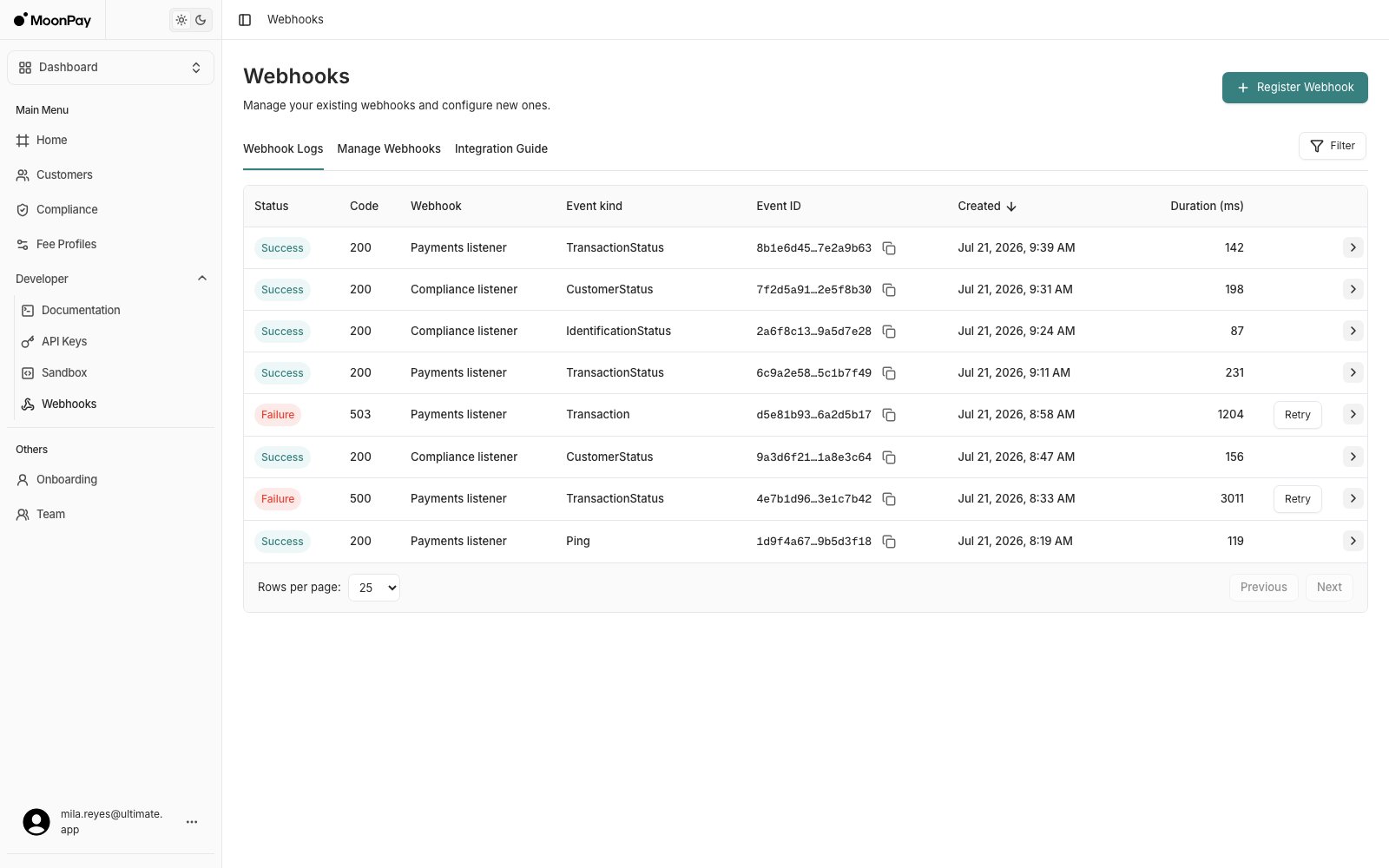
Webhook Logs: one row per delivery attempt
Register Webhook
Click Register Webhook on the Webhooks page.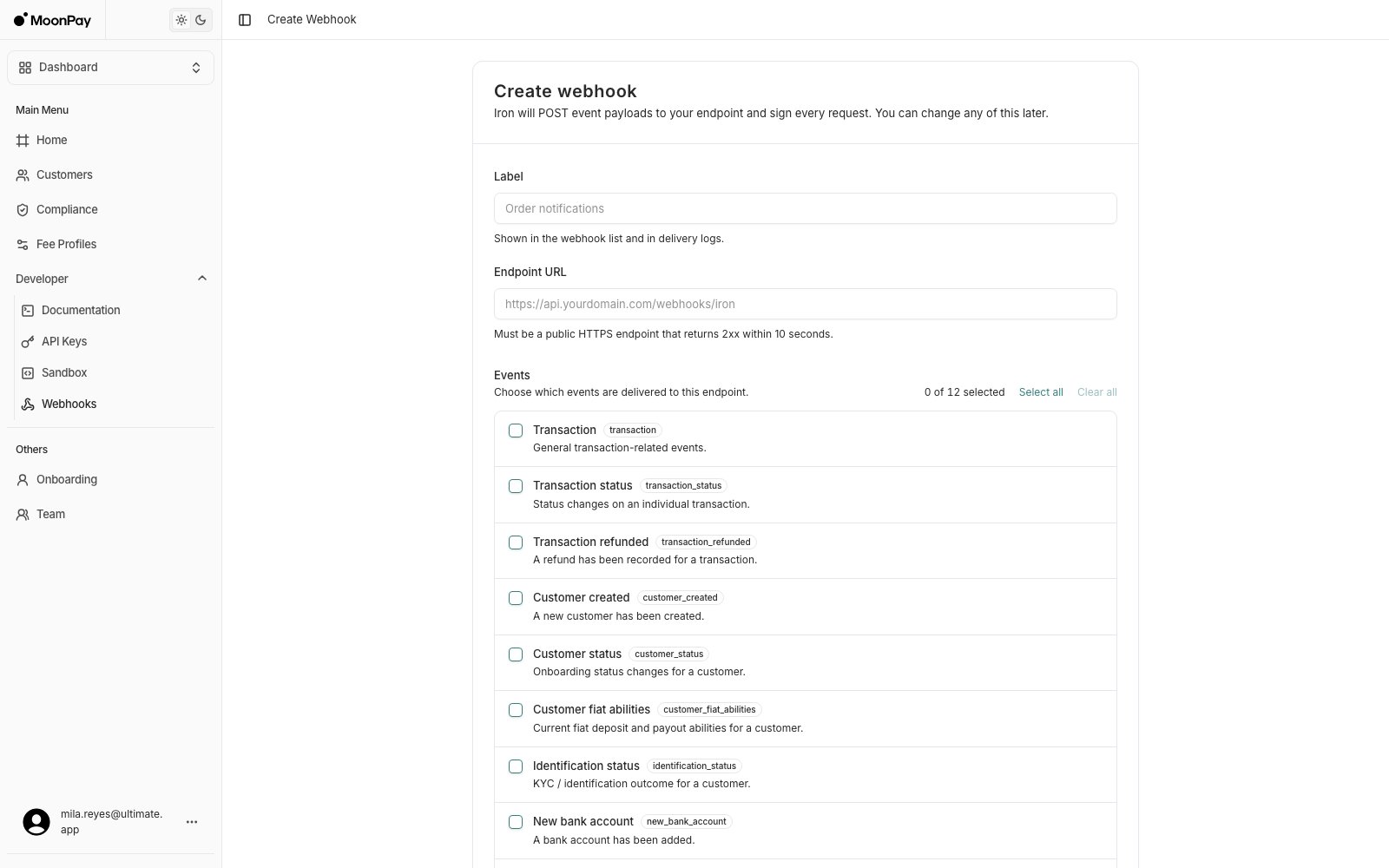
Create webhook
- Label: Shown in the webhook list and in the delivery logs
- Endpoint URL: A public
https://URL that returns a 2xx within 5 seconds - Events: The event kinds delivered to this endpoint.
pingis always on, so a test delivery works on every endpoint
webhook secret. This is needed to validate the webhook signature.
Implement Webhooks
The Partner Area webhook console provides sample code for webhook signature validation. However, additional information can be found below. Overview- Webhook ID: newEvent
- Method: POST
- Content Type: application/json
- Authentication: HMAC-SHA256 signature (via headers)
- Trigger: Emitted when a relevant customer or platform event occurs
Receiving Webhook Requests
MoonPay Enterprise will send webhook notifications to the endpoint URL you’ve registered during integration setup. Each request includes headers for verification, and a JSON body describing the event.HTTP Headers
MoonPay Enterprise follows the Standard Webhooks specification. Every delivery includes these headers:Signature Verification
Verify the signature with your webhook secret:1
Extract the
webhook-timestamp and webhook-signature from the headers.2
Remove the
v1= prefix from the signature.3
Concatenate
webhook-timestamp + raw_body (no whitespace or formatting).4
Compute the HMAC-SHA256 digest using your webhook secret key.
5
Reject the request if
webhook-timestamp falls outside your tolerance window. The examples below use 5 minutes.6
Use constant-time comparison to check if the computed digest matches the signature.
Webhook Payload
Webhook requests include a top-levelWebhookContainer object. The message field varies depending on the event type.
Example Payloads
Below is one example payload pertype the webhook can deliver. Each block is a complete WebhookContainer, the exact shape MoonPay Enterprise POSTs to your endpoint.
transaction: a new transaction happened for this customer. See Autoramp.
new_autoramp: a new autoramp was created by or for this customer. See Autoramp.
new_bank_account: a new bank account was registered by or for this customer. See Fiat addresses.
deposit_address_created: the autoramp with id received a deposit address. See Autoramp.
customer_created: a new customer has been created. See Onboarding.
transaction_status: the status of a transaction changed. See Transaction status.
transaction_refunded: a refund was recorded for a transaction. See Transaction status.
register_fiat_address_status: the status of a fiat address changed. See Fiat addresses. This fires for every fiat address registration, including accounts with no external provider step that go straight to Registered.
customer_status: the status of a customer has changed. See Onboarding.
customer_fiat_abilities: the customer’s fiat deposit or payout rails changed. See Onboarding. Subscribe to this instead of polling GET /api/customers/{id}/abilities. MoonPay Enterprise recomputes abilities and fires this event when an identification is approved, a signing is recorded, a compliance review changes the customer, or a banking provider finishes registering a rail.
id is the customer, the same UUID as data.customer_id.Each delivery carries the customer’s full fiat ability snapshot, not a diff, and MoonPay Enterprise does not compare it against what it sent last time. The same snapshot can arrive twice, so diff the payload against your stored copy and act on the rails that actually moved.The snapshot covers fiat_deposit and fiat_payout only. It does not include the currencies array that GET /api/customers/{id}/abilities returns, so call the endpoint when you need per-currency flow availability (mint, redeem, onramp, offramp, swap).register_autoramp_status: the status of an autoramp has changed. See Autoramp status.
identification_status: the status of an identification has changed. See KYC.
ping: a ping event, sent during webhook setup or from the Ping button in the Webhook Console.
Payload Schema
WebhookContainer (object)
WebhookNotification (inside data)
The delivered
type is snake_case (transaction_status). The topics you subscribe a webhook to are PascalCase (TransactionStatus). Both name the same events, so map between the two casings when you route deliveries.Supported Event Types
Each message object follows a typed schema depending on the type of event.- WebhookEventMessage
- WebhookFiatAddressStatusMessage
- WebhookAutorampStatusMessage
- WebhookTransactionStatusMessage
The
status field is deprecated. Use transaction_status instead for the current transaction state.The transaction_hash field is only present when the payout destination is a blockchain address (crypto payouts).- WebhookCustomerStatusMessage
- WebhookCustomerFiatAbilitiesMessage
Active, Pending, Unavailable, Blocked, Maintenance. See Ability Status for the rails each currency carries and what each status means.
- WebhookPingMessage
- WebhookIdentificationStatusMessage
Pending → Customer has not started the process, or a business submission is waiting on missing items (resume url on the identification)
Processed → Customer has completed the input process
PendingReview → Identification is ready for review by Compliance Team
Approved → Identification has been approved by Compliance Team
Declined → Identification has been declined by Compliance Team
Expired → The identification process was not completed and has been expired
Archived → The identification is no longer active and has been archived
- WebhookTransactionRefundedMessage
Response
Your webhook endpoint must return:HTTP/1.1 200 OK
Return 200 to acknowledge successful receipt. Any other status code triggers a retry.
We recommend logging all webhook-id and response statuses for audit and troubleshooting purposes.
Error Handling & Retries
- If your service remains unavailable, MoonPay Enterprise may pause webhook delivery.
- Each retry gets a new webhook-id. Deduplicate using the event’s
data.customer_idplus the contents ofmessage. - Webhooks that fail (non-2xx status or timeout) will be retried with exponential backoff.
- You can see failing webhooks in the Partner Area
Sample Signature
TheRaw payload below is the exact byte string MoonPay Enterprise signs and POSTs: the full WebhookContainer, not just the inner notification. HMAC the timestamp + this raw body to reproduce the signature.